The Aftershoot alternative you pay for once.
Culla opens the memory card itself — no import, no album, no account — and Smart Cull takes out the blurred shots and near-duplicates right on your Mac. For culling, that's $24.99 once instead of a subscription, and it covers your iPhone and iPad too.
Culla and Aftershoot, side by side.
| Culla | Aftershoot | |
|---|---|---|
| Price | $24.99 once on the App Store — one purchase for Mac, iPhone and iPad | Select (culling only): $15 a month, or $120 a year billed annually. Subscription only |
| Where you cull | Right on the memory card, an external disk, any folder or a Photos album. Nothing to import | In an Aftershoot album: photos are imported first, and a card can be backed up to your drive |
| AI culling | Smart Cull takes out failed shots, or gets the shoot down to the number you ask for, keeping the best of each burst | Automated AI culling with your own thresholds or a target count, or AI-assisted culling |
| Account and internet | No account. Culla never connects to the internet | An Aftershoot account and subscription |
| Editing and retouching | No — Culla is made for culling | Yes, with the Edit and Retouch plans |
| Handing off to your editor | A tag can stand for a star rating or color label, written to the XMP sidecar for Lightroom, Capture One and Photo Mechanic. Or export a tag's photos to a folder | Export to Lightroom Classic, Capture One or a folder |
| Platforms | Mac, iPhone and iPad: macOS 26 or later on Apple silicon and Intel; iOS and iPadOS 26 or later | Mac and Windows; no iPhone or iPad app |
Choose Culla if
- You'd rather pay once than every month.
- You want to cull straight from the card, before anything is copied or imported.
- Your photos shouldn't leave your Mac, and you don't want another account.
- You want AI to clear out the misses, and the final picks to be yours.
- You'd like to cull on an iPad or iPhone too, with the same purchase.
Stay with Aftershoot if
- You want AI editing and retouching in the same app as culling.
- You want the AI to make the whole selection, and only check it afterwards.
- You work on Windows, or on a Mac that can't run macOS 26.
The card is the workspace.
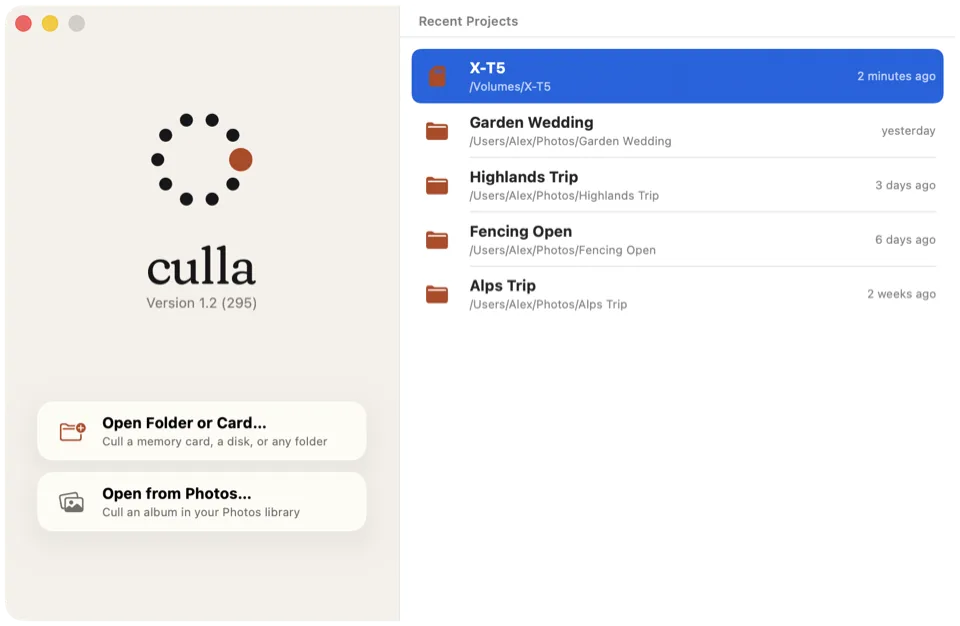
Aftershoot starts by bringing a shoot into an album. Culla skips that step: open the card and photos appear while it's still scanning.
- Rejected photos move into a hidden folder next to the originals, so they stay rejected wherever you open the card next.
- Tags are saved on the card too, and a tag can stand for a star rating or color label that Lightroom and Capture One read from the XMP sidecar.
- Nothing is deleted until you ask for it, and only the keepers go on to your editor.
Cull on the Mac, the iPad or the iPhone.
Aftershoot is a desktop app for Mac and Windows. Culla runs on Mac, iPhone and iPad, and one purchase covers all three.
On an iPad or iPhone, open a memory card in a card reader, a disk or a folder in Files, or an album of your Photos library. Swipe to the next photo and tap to reject or tag; Smart Cull runs right on the device.
Tags and Smart Cull's results are saved on the card, in a hidden folder next to the photos. Start on the iPad on location and finish on the Mac at home — the card remembers where you left off.
A first pass done for you, on your Mac.
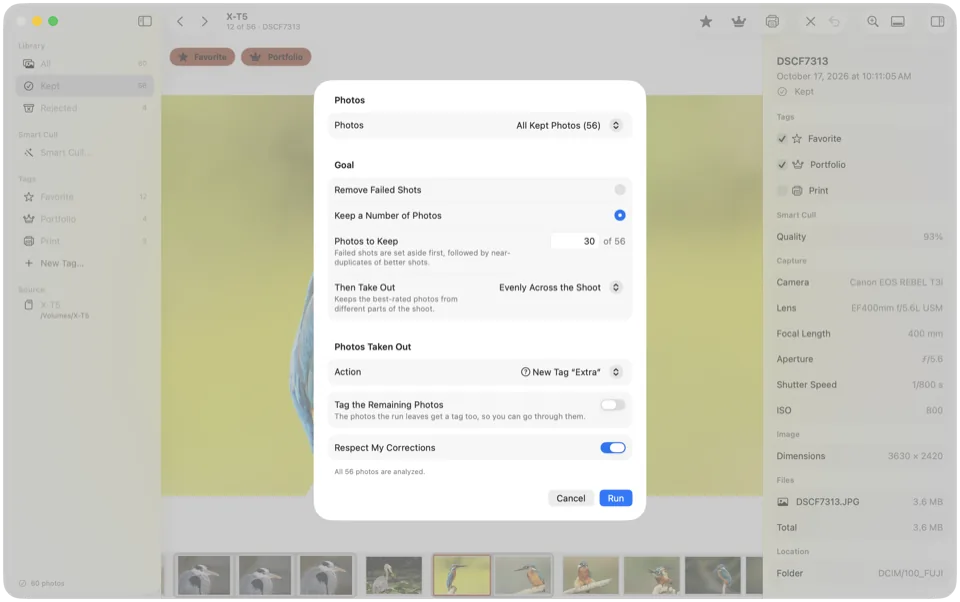
Smart Cull analyzes the shoot right on your device, in the background. It's built to clear out the obvious misses, so your own pass is shorter.
- Remove Failed Shots takes out blurred, badly exposed and other clearly poor photos, as strictly as you like.
- Keep a Number of Photos drops failed shots first, then near-identical copies of a better shot.
- It tags or rejects what it takes out, and the inspector says why. One Undo takes back the whole run.
No subscription, no account, no network.
Aftershoot is subscription-only: culling alone is $120 a year billed annually, or $15 a month. Culla is $24.99 once on the App Store, for your Mac, iPhone and iPad.
There's no account to create and nothing to sign in to. Culla doesn't connect to the internet at all, so nothing about your photos leaves your device — not the photos, not the analysis, not how you use the app.
Already pay for Aftershoot Edit? Aftershoot sells its plans separately, so you can keep Edit, drop Select and cull in Culla.
Your next shoot, culled in Culla.
Open the card
Insert the card and open it in Culla. Photos appear while it's still scanning, in the order they were taken.
Let Smart Cull go first
Choose Remove Failed Shots or Keep a Number of Photos. Check what it took out in the filmstrip, and restore anything with U.
Pick and hand off
Tag your picks with one key — a tag can be a star rating or color label — then import the keepers into Lightroom, Capture One or any editor, or export a tag's photos to a folder.
Culla vs Aftershoot, answered.
Can Culla replace Aftershoot?
For culling, yes: you reject, tag and keep photos right on the card, and Smart Cull does the first pass. Culla doesn't edit or retouch photos, so if you use Aftershoot for that, keep the Edit or Retouch plan and cull in Culla.
Does Culla upload my photos for the AI?
No. Smart Cull runs right on your Mac, iPhone or iPad, in the background while you work. Culla doesn't connect to the internet at all.
Will Lightroom see my picks?
Yes. A tag can stand for a star rating or color label, and Culla writes it to the photo's XMP sidecar, which Lightroom reads when you import. Rejected photos are moved aside into a hidden folder, so importing what's left on the card brings in only the keepers. Or export a tag's photos to a folder and import that.
Can I cull on an iPad or iPhone?
Yes. It's the same Culla, and one purchase covers your Mac, iPhone and iPad. Open a memory card in a card reader, a disk or a folder in Files, or an album of your Photos library. Tags and Smart Cull's results are saved on the card, so you can start on the iPad and finish on the Mac. Our guide shows how to cull photos on an iPad.
Does Culla run on Windows?
No. Culla runs on Mac, iPhone and iPad: macOS 26 or later on Apple silicon and Intel Macs, and iOS and iPadOS 26 or later.
Aftershoot's prices and features as of November 2026, from Aftershoot's pricing, help center and downloads. Culla's price is the US App Store price, one purchase for Mac, iPhone and iPad; it varies by country. Aftershoot is a trademark of its owner. Culla isn't affiliated with Aftershoot.

Cull your next shoot on the card.
One-time purchase for Mac, iPhone and iPad. No account, no subscription.