A FastRawViewer alternative that takes out the misses for you.
Like FastRawViewer, Culla opens the card directly, with no catalog. Then Smart Cull does what FastRawViewer leaves to you: it takes out blurred shots and near-identical copies, so there are fewer frames to decide on — on your Mac, iPad or iPhone.
Culla and FastRawViewer, side by side.
| Culla | FastRawViewer | |
|---|---|---|
| Price | $24.99 once on the App Store — one purchase for Mac, iPhone and iPad | One-time license for two computers, Mac and Windows; 30-day trial |
| Opening a card | Right on the card. No catalog | Right on the card. No catalog |
| Automatic culling | Smart Cull takes out failed shots, or gets the shoot down to the number you ask for | None — every frame is decided by hand |
| Near-identical shots | Grouped in the filmstrip; Smart Cull keeps the best of each series | Not grouped |
| RAW inspection | Full-resolution zoom; camera, lens and exposure in the inspector | Renders the RAW data itself, with a RAW histogram, clipping display and focus peaking |
| Rejected photos | Moved into a hidden folder next to the originals | Moved into a _Rejected subfolder |
| Ratings in XMP | A tag can stand for a star rating or color label, written to the XMP sidecar, which Lightroom reads. Changes made there come back | Ratings and labels written to XMP, which Lightroom reads (its reject flag is ignored) |
| Platforms | Mac, iPhone and iPad: macOS 26 or later on Apple silicon and Intel; iOS and iPadOS 26 or later | Mac and Windows, native on Apple silicon; no iPhone or iPad app |
Choose Culla if
- You want blurred shots and duplicates gone before your own pass.
- You want bursts to sit together, with the best frame one key away.
- You sort picks into your own tags — Favorite, Print, Portfolio — each with its own key, and a star rating or color label for Lightroom.
- You'd like to cull on an iPad or iPhone too, with the same purchase.
Stay with FastRawViewer if
- You judge exposure from the RAW data itself: RAW histogram, clipping, ETTR.
- You rely on focus peaking to check sharpness.
- You also work on Windows, or on a Mac that can't run macOS 26.
Fewer frames to decide on.
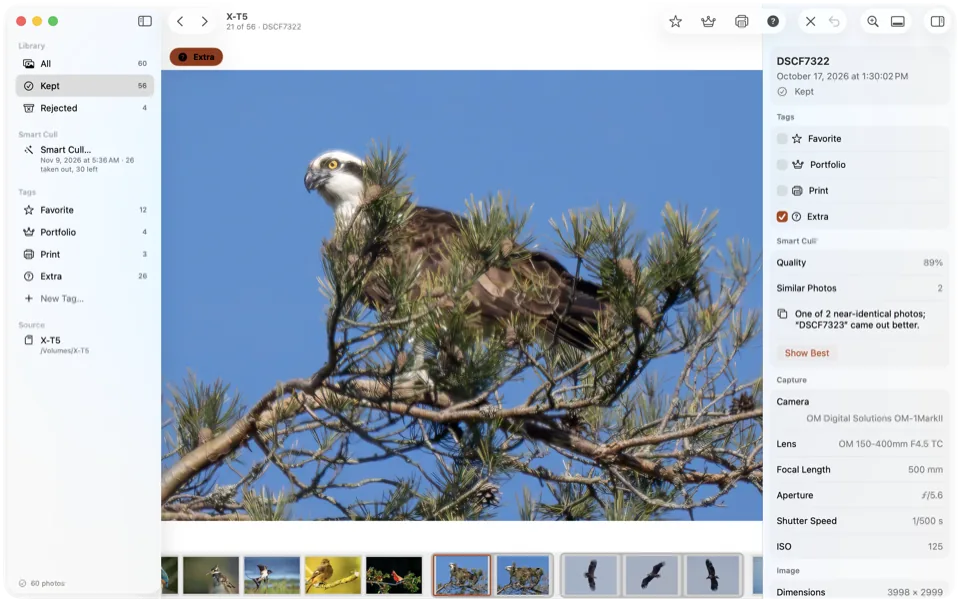
FastRawViewer is built for judging every frame by hand. Culla adds Smart Cull: it analyzes the shoot on your Mac and takes out blurred, badly exposed and near-identical shots, as strictly as you like.
- Keep a Number of Photos gets the shoot down to the count you ask for, keeping the best of each series.
- Bursts sit together in the filmstrip, and Show Best jumps to the frame that came out better.
- It tags or rejects what it takes out, and one Undo takes back the whole run.
Cull on the Mac, the iPad or the iPhone.
FastRawViewer's license covers two computers, Mac or Windows. Culla runs on Mac, iPhone and iPad, and one purchase covers all three.
On an iPad or iPhone, open a memory card in a card reader, a disk or a folder in Files, or an album of your Photos library. Swipe to the next photo and tap to reject or tag; Smart Cull runs right on the device.
Tags and Smart Cull's results are saved on the card, in a hidden folder next to the photos. Start on the iPad on location and finish on the Mac at home — the card remembers where you left off.
One key per decision.
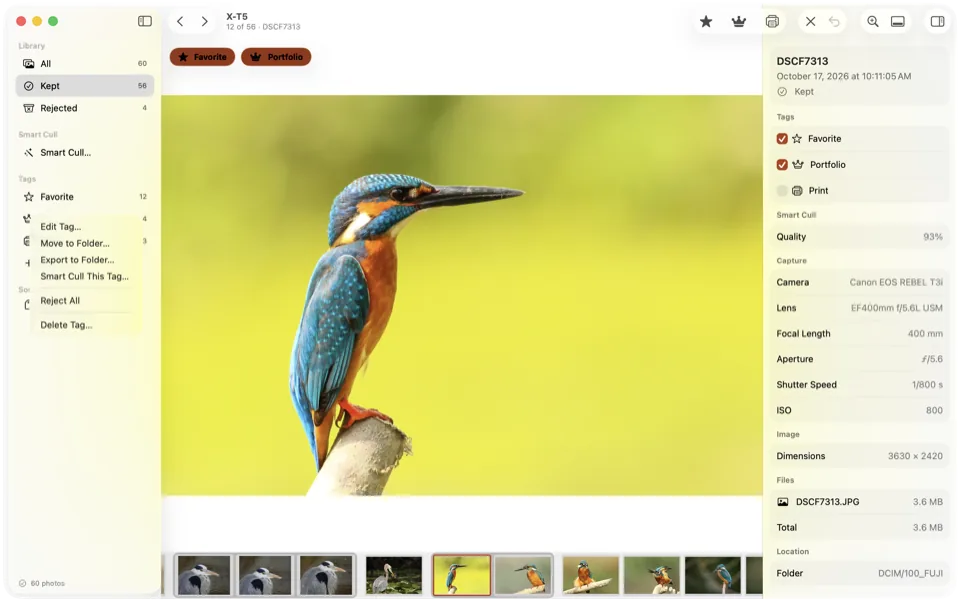
X rejects, L marks a Favorite, and the next photo is already on screen. Make your own tags, each with a name, an icon, a key and its own collection.
- A tag can stand for a star rating or color label in the XMP sidecar, so Lightroom, Capture One and Photo Mechanic see your picks.
- Export a tag's photos to any folder, or move them into a folder of the project.
- Shortcuts can be changed, and follow key positions, so they work with any keyboard layout.
Same card, careful moves.
Both apps cull right on the card with no catalog, and both move rejects aside instead of deleting them. Culla also keeps a RAW file, its JPEG or HEIC twin and its XMP sidecar together every time it moves a photo.
Rejected photos go into a hidden folder, so the card's folders stay as they were and the photos stay rejected wherever you open the card next. Tags and Smart Cull's analysis are saved there too, so they go wherever the card goes.
Undo is unlimited, holding a key doesn't repeat Reject, read-only cards are respected, and same-named files are never overwritten.
Your next shoot, culled in Culla.
Open the card
Insert the card and open it in Culla. Photos appear while it's still scanning, in the order they were taken.
Let Smart Cull go first
Choose Remove Failed Shots or Keep a Number of Photos. Check what it took out in the filmstrip, and restore anything with U.
Decide and hand off
Go through what's left with one key per decision, then import the keepers into your editor — with their star ratings and color labels — or export a tag's photos to a folder.
Culla vs FastRawViewer, answered.
Does Culla show a RAW histogram or focus peaking?
No. Culla shows the full-resolution image when you zoom in, and the inspector shows camera, lens, focal length, aperture, shutter speed and ISO. For exposure analysis from the RAW data, FastRawViewer is the specialist.
Does Culla write ratings to XMP?
Yes. A tag can stand for a star rating or a color label, and Culla writes it to the photo's XMP sidecar, leaving the rest of the sidecar as it is. Lightroom, Capture One and Photo Mechanic see your picks. It works both ways — change a rating in another app, and Culla's tags follow the next time you open the project. Rejects aren't a flag in the sidecar; the photos are moved aside.
Can I cull on an iPad or iPhone?
Yes. It's the same Culla, and one purchase covers your Mac, iPhone and iPad. Open a memory card in a card reader, a disk or a folder in Files, or an album of your Photos library. Tags and Smart Cull's results are saved on the card, so you can start on the iPad and finish on the Mac. Our guide shows how to cull photos on an iPad.
Which cameras does Culla support?
RAW files from most cameras — RAF, CR3, CR2, NEF, ARW, ORF, RW2 and DNG — plus JPEG and HEIC. RAW decoding is done by macOS, iOS and iPadOS, so support for brand-new cameras arrives with system updates.
Does Culla run on Windows?
No. Culla runs on Mac, iPhone and iPad: macOS 26 or later on Apple silicon and Intel Macs, and iOS and iPadOS 26 or later.
FastRawViewer's features and license terms as of November 2026, from FastRawViewer's website and purchase page. Culla's price is the US App Store price, one purchase for Mac, iPhone and iPad; it varies by country. FastRawViewer is a trademark of its owner. Culla isn't affiliated with LibRaw.

Cull your next shoot on the card.
One-time purchase for Mac, iPhone and iPad. Smart Cull included.