An Adobe Bridge alternative made for culling.
Like Bridge, Culla opens a card or a folder directly, with no catalog. But Culla is made for one job — going through a shoot and keeping the best — so Smart Cull takes out the misses first, bursts sit together, and one key decides each photo, on your Mac, iPad or iPhone.
Culla and Adobe Bridge, side by side.
| Culla | Adobe Bridge | |
|---|---|---|
| Price | $24.99 once on the App Store — one purchase for Mac, iPhone and iPad | Free download with an Adobe account; editing RAW in Camera Raw from Bridge needs a Photoshop subscription |
| Opening a card | Right on the card. No catalog | Browses the card's folders directly. No catalog; Import Media copies photos to a folder if you want |
| Automatic culling | Smart Cull takes out failed shots, or gets the shoot down to the number you ask for | None — every photo is rated by hand |
| Near-identical shots | Grouped in the filmstrip; Smart Cull keeps the best of each series | Stacked by hand; Auto-Stack groups panorama and HDR sets for merging in Photoshop |
| Looking closely | Full-resolution zoom with Space; camera, lens and exposure in the inspector | Full-screen preview, Review mode, a Loupe at 100% and up to nine photos side by side |
| Rejected photos | Moved into a hidden folder next to the originals | Labeled Reject, and can be hidden from view; the files stay in the folder until you delete them |
| Ratings in XMP | A tag can stand for a star rating or color label, written to the XMP sidecar. Changes made in other apps come back | Stars and color labels written to XMP, which Lightroom and Camera Raw read; labels are stored by name |
| Account | None. Culla never connects to the internet | An Adobe account and an internet connection to activate and use it |
| Platforms | Mac, iPhone and iPad: macOS 26 or later on Apple silicon and Intel; iOS and iPadOS 26 or later | Mac (macOS 14 or later) and Windows; no iPhone or iPad app |
Choose Culla if
- You want blurred shots and duplicates gone before your own pass.
- You want bursts grouped for you, with the best frame one key away.
- You'd rather reject with one key and have the misses moved out of the way, not just hidden.
- You don't want an Adobe account for culling.
- You'd like to cull on an iPad or iPhone too, with the same purchase.
Stay with Adobe Bridge if
- You rely on batch renaming, keywords and metadata templates, or collections.
- You hand photos straight to Photoshop and Camera Raw.
- You make contact sheets, export or publish to Adobe Stock from Bridge.
- You also work on Windows, or on a Mac that can't run macOS 26.
A first pass that Bridge leaves to you.
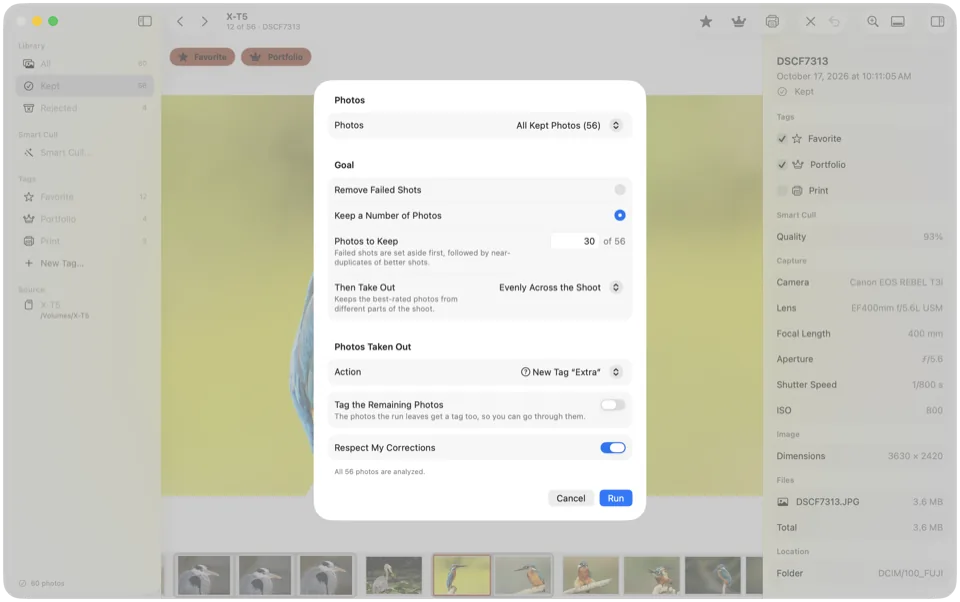
Bridge gives you stars, labels and a good loupe, and the deciding is all yours. Culla adds Smart Cull: it analyzes the shoot on your Mac and takes out blurred, badly exposed and near-identical shots, as strictly as you like.
- Remove Failed Shots takes out clearly poor photos; Keep a Number of Photos gets the shoot down to the count you ask for.
- It tags or rejects what it takes out, and the inspector says why.
- One Undo takes back the whole run.
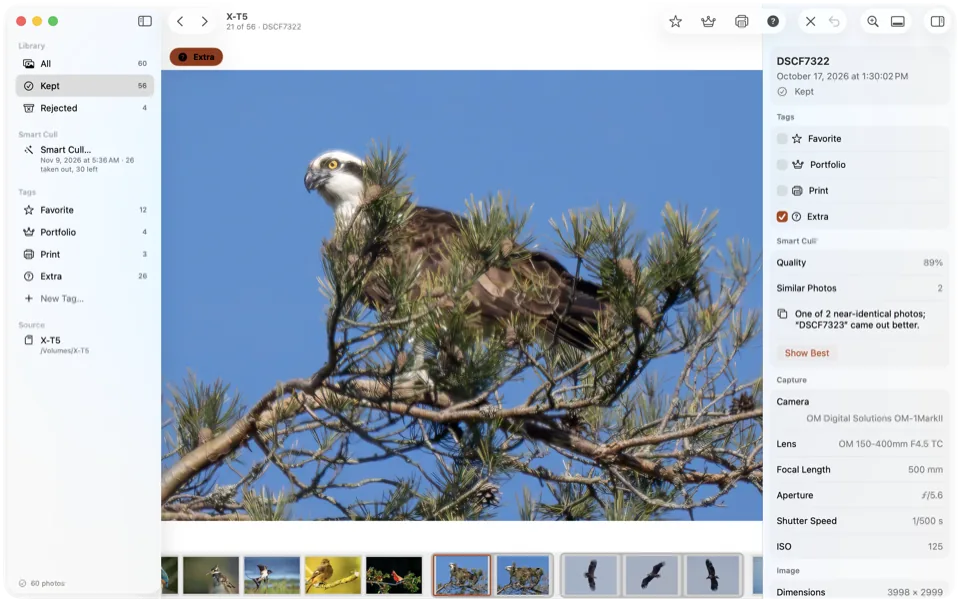
Every burst in one place.
In Bridge, similar frames are stacked by hand. In Culla, near-identical shots sit together in the filmstrip on their own, and Show Best jumps to the frame that came out better.
- ⌥⌘← and ⌥⌘→ hop from one series to the next.
- Press Space to zoom in, and Culla loads the full-resolution image while you look.
- Smart Cull can keep the best of each series and take out the rest.
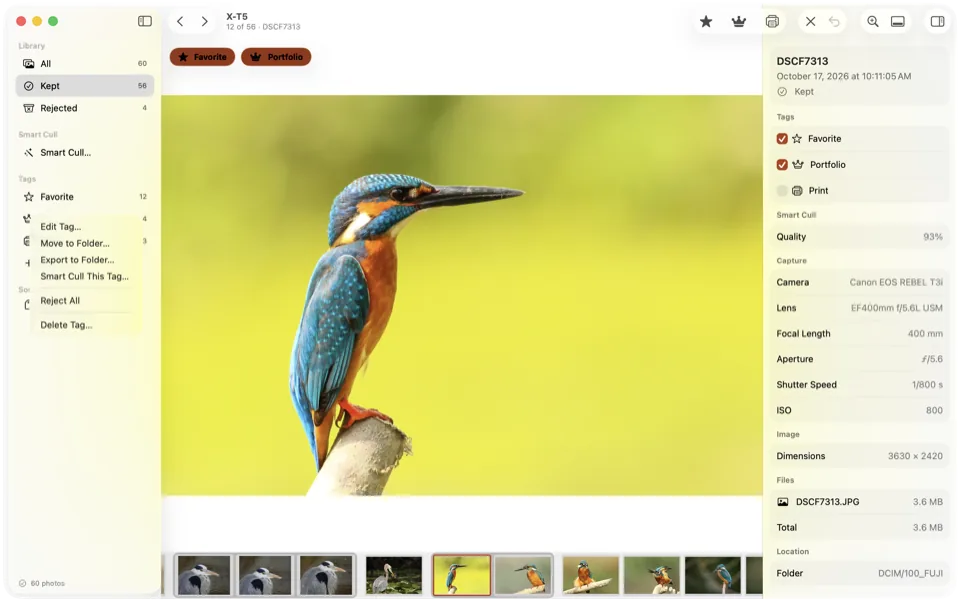
Reject means out of the way.
X rejects, L marks a Favorite, and the next photo is already on screen. A rejected photo moves into a hidden folder next to the originals, so the folder you hand to your editor holds only what's left.
- Make your own tags, each with a name, an icon, a key and its own collection.
- A tag can stand for a star rating or color label in the XMP sidecar, so Bridge, Lightroom and Camera Raw see your star ratings.
- Rejected photos stay rejected wherever you open the card next, and restoring moves them back.
Cull anywhere, with no account.
Bridge runs on Mac and Windows and needs an Adobe account. Culla runs on Mac, iPhone and iPad, never connects to the internet, and one purchase covers all three.
On an iPad or iPhone, open a memory card in a card reader, a disk or a folder in Files, or an album of your Photos library. Swipe to the next photo and tap to reject or tag; Smart Cull runs right on the device.
Tags and Smart Cull's results are saved on the card, in a hidden folder next to the photos. Start on the iPad on location and finish on the Mac at home.
Cull in Culla, keep Bridge for the rest.
Open the card in Culla
Insert the card and open it in Culla. Photos appear while it's still scanning, in the order they were taken.
Let Smart Cull go first
Choose Remove Failed Shots or Keep a Number of Photos, then decide on the rest with one key. Give a tag a star rating or color label for your other apps.
Carry on as before
Open the folder in Bridge — the rejects are already out of the way, and the star ratings are there — or import the keepers into your editor.
Culla vs Adobe Bridge, answered.
Is Adobe Bridge free?
Adobe offers Bridge as a free download, with an Adobe account and an internet connection to activate and use it. Editing RAW files in Camera Raw from Bridge needs a Photoshop subscription. Culla is a one-time purchase of $24.99 on the App Store, with no account, and covers Mac, iPhone and iPad.
Will Bridge see the ratings I set in Culla?
Star ratings, yes. A tag can stand for a star rating or a color label, and Culla writes it to the photo's XMP sidecar, which Bridge, Lightroom and Camera Raw read; change a rating in Bridge, and Culla's tags follow the next time you open the project. Color labels are stored by name — Culla writes Red, Yellow, Green, Blue or Purple — so Bridge shows them in color when its own labels have those names, which you can set in Bridge's preferences.
Does Culla do batch renaming or keywords?
No. Culla is for culling — deciding which photos to keep. Keep Bridge, Photo Mechanic or your editor for renaming, keywords and captions.
Can I cull on an iPad or iPhone?
Yes. It's the same Culla, and one purchase covers your Mac, iPhone and iPad. Open a memory card in a card reader, a disk or a folder in Files, or an album of your Photos library. Our guide shows how to cull photos on an iPad.
Does Culla run on Windows?
No. Culla runs on Mac, iPhone and iPad: macOS 26 or later on Apple silicon and Intel Macs, and iOS and iPadOS 26 or later.
Adobe Bridge's features and terms as of November 2026, from Adobe's Bridge page and help pages on requirements, Camera Raw editing, labels and ratings, previewing, stacks, Auto-Stack, Import Media and metadata. Culla's price is the US App Store price, one purchase for Mac, iPhone and iPad; it varies by country. Adobe, Bridge, Lightroom and Photoshop are trademarks of Adobe Inc. Culla isn't affiliated with Adobe.

Cull your next shoot on the card.
One-time purchase for Mac, iPhone and iPad. Smart Cull included.